


Play Games 365
Games en Languages
Games English
Spiele Deutsch
Juegos Español
Jeux Français
Jogos Português
игры Русский
Giochi Italiano
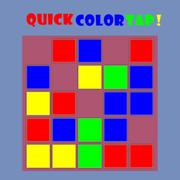
Quick Color Tap

Quick Color Tap

Play Quick Color Tap

You see a screen with 16 colored squares (4 colors of red, blue, green and yellow) and by tapping once on the screen, the game will start. As soon as the game starts, the background color will blink very quickly with one of those 4 colors and you have to choose a square with the same color to remove it. If you choose a square with a different color, you will lose. This will continue until every square is removed and you will win when you have successfully removed all squares. You have to do your best to do this as fast as possible so that your final record time is lower!

How to play:

Use your mouse to play the game or tap on the screen!

Play Parking Jam
Parking Jam
Play Adventure Escape
Adventure Escape
Play Hunted Wolf Defense Game
Hunted Wolf Defense Game
Play Fruit Samurai
Fruit Samurai
Play Jungle Hidden Animals
Jungle Hidden Animals
Play Racerking
Racerking
Play City Driver
City Driver
Play Impossible US Army Tank Driving Game
Impossible US Army Tank Driving Game
Play Kill The Dragon - Bridge Block Puzzle
Kill The Dragon - Bridge Block Puzzle
Play Christmas Stockings Memory
Christmas Stockings Memory
Play Army Attack
Army Attack
Play Crystical
Crystical
Play Ball Racer
Ball Racer
Play Squirrel Hero
Squirrel Hero
Play Parrot Simulator
Parrot Simulator
Play Crescent Solitaire
Crescent Solitaire
Play Pixie Pregnant Check Up
Pixie Pregnant Check Up
Play Magic Bar
Magic Bar
Play Motorcycle Escape
Motorcycle Escape
Play Christmas Cupcake Match 3
Christmas Cupcake Match 3
Play Rachel Sweet Candy Shop
Rachel Sweet Candy Shop
Play Christmas Tree Inspired Hairstyles
Christmas Tree Inspired Hairstyles
Play Duel Of Builders
Duel Of Builders
Play The Rings Puzzle
The Rings Puzzle
We use cookies for content recommendations, traffic measurement, and personalized ads. By using this website, you agree to the Privacy Policy and Cookie Policy.
Got it